
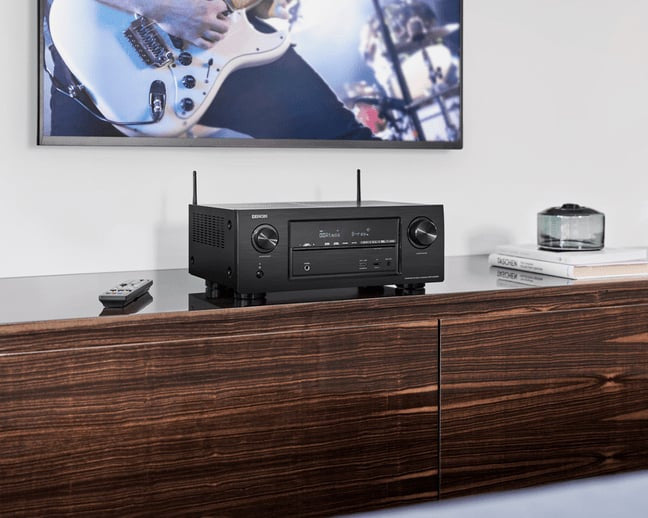
Understanding AV receivers: Why do you need one? — Part 1

April 26, 2017
Understanding AV receivers: Why do you need one? — Part 1
Published on  Updated on  

Understanding AV receivers

In your search for the ultimate home theatre system, you come across various audio and video electronics such as speakers, media players (Blu-Ray, DVD players, HTPCs etc.), displays (flat-panel TVs and projectors) and AV receivers among a huge list of others. From all the above-mentioned electronics, the AV receiver (AVR) is often the most misunderstood and underutilised component of multichannel home theatre systems.

In our conversations with numerous home theatre enthusiasts, we’ve realised that while a few people have a fair understanding of the role of an AV receiver, there are a few users who could use some help in getting to know this crucial home theatre system component. This blog-cum-guide from Ooberpad not only helps you understand AV receivers but also shares valuable ideas, tips and tricks to get the most out of your home theatre system.

What is an AV receiver?

An A/V receiver is the electronic component that controls and drives your home theatre experience. Without any doubt, the AV receiver is the hub of a home theatre system. It takes in audio and video signals from various sources and routes them to their respective outputs. For e.g. If you have connected a Blu-ray player to an AV receiver via HDMI (for both audio and video signals), the AVR sends the video signal to the connected display (TV or Projector) and the audio signals to the speaker system (5.1 or 2.1).

What does an AV receiver do?

Before you can evaluate A/V receivers, you need a good understanding of its functionality and the tasks it is capable of handling. Below are 5 key functions of a regular AV receiver.

  • Connecting and switching between audio sources
    Every audio source in your home theatre such as CD players, Turntables or digital audio players connect to your A/V receiver. The preamplifier section of the AV receiver allows you to easily switch or select between the connected audio source that you want to listen to. That’s right, with AV receivers, you can say goodbye to connecting and disconnecting wires manually, everything can be switched just by pressing a few buttons.

  • Connecting and switching between video sources
    All video source devices are also connected directly to the A/V receiver, which is further connected to your display devices such as the Television or the Projector. This setup greatly simplifies the selection of video sources when you either want to play Blu-Ray or DVD movies, connect your gaming consoles or connect to online streaming media via laptops or other computing devices. In most cases, you can easily select what you want to watch via the AV receiver’s remote. It saves you the hassle adjusting or manually connecting cables between the multiple sources and the connected display. 

  • Amplifies audio signals to drive multiple speakers
    An important functionality of an A/V receiver is that it contains at least five channels of amplification to drive or provide power to your surround-sound speaker system. Not only does its amplify the signal but it also ensures that the right signal reaches the right speaker. It is important to know that currently there are AV receivers that even support 7.1 and 9.1 channel configurations.

  • Decodes surround-sound format
    Today’s movies and games are available in numerous surround-sound technologies such the popular Dolby DTS, Atmos and THX among others. From all the components of a home theatre system, the AV receiver is the only one with the ability to decode analogue and digital surround-sound formats. These surround-sound technologies make the audio immersive and create a cinema-like experience. The ability to decode surround-sound formats is a feature that distinguishes an A/V receiver from traditional stereo amplifiers you may have come across.

  • Radio tuning
    Part of the definition of an AV receiver is that it includes a radio tuner. Many A/V receivers include satellite radio receivers for Sirius or XM radio. However, it is important to know you’ll have to pay extra for the satellite radio subscription service. AV receivers also have the built-in capability to play local FM and AM radio stations.

  • User interface for home theatre setup
    An AV receiver also assists in connecting, setting up and optimising home theatre systems via a simple user interface. The interface options include the receiver’s remote control, the display on the receiver’s front panel and an on-screen display on your television.

  • Other connectivity options
    Apart from all the functions mentioned above, modern AV receivers offers a range of other features such internet connectivity via Ethernet ports or WiFi, wireless music streaming via Bluetooth, wireless video casting or screen mirroring via DLNA/Miracast/Airplay, multi-room audio output and even DSP-based room-calibration for optimized sound among a huge list of others. Many of these additional features depend on the make, model and price of the AV receiver.

What are the basic components/aspects to look for in an AV receiver?

Below are key aspects to consider especially while you are looking to buy an AV receiver.
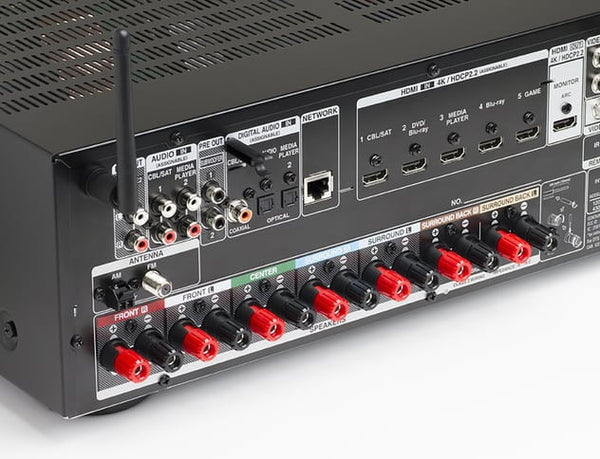
Tech Tips : Basics about AV Receiver

  • Power output
    Power output is one of the first features you look for when selecting an AV receiver. The power rating of your speakers dictates the kind of receiver you would require. In AV receivers, the power ratings are described in watts per channel where each channel is one speaker. On most receivers, you’ll see impedance measured at 8 ohms. Make sure that number matches the impedance of your speakers. The power rating of the speakers such as Watts and Impedance (Ohms) should be mentioned in product literature/manual or on the back panel of the speaker enclosure itself.

    A good thumb rule is to have sufficient headroom in terms power between the speaker and the receiver’s amplification. For e.g. if your speaker is rated at 50W @ 8 Ohm, it would be wise to opt for an AV receiver with at least 100W at @ 8 Ohm. This is mainly done for two reasons, firstly, to ensure that the speakers are not under powered and secondly to future-proof your AV receiver in case you plan on upgrading to a speaker with a higher wattage.

  • Video inputs
    Most of today’s AV receivers feature HDMI, component and composite inputs for video signal connectivity. Ensure to opt for an AV receiver that is compatible with your current source and display equipment or for the one with the latest specifications. The number of inputs heavily depends on your requirements. We suggest opting for a model with at least 3 HDMI inputs.

  • Audio inputs
    AV receiver can accept audio from various sources such as HDMI, digital optical, coaxial and analogue stereo inputs. If you want to listen to vinyl records, then the AV receiver should have a phono input. Additionally, many AV receivers may also feature 3.5mm jack for AUX connectivity or 6.35mm for basic karaoke microphone connectivity.

  • Multi-channel speaker outputs
    The number of multi-channel speaker outputs also plays an important role while looking for an AV receiver. Currently, most AV receivers are built for 5.1 or 7.1 channel surround system. For a basic home theatre setup, you must have a minimum of 5 speakers and 1 subwoofer (5.1). For a fuller experience, you could opt for a 7.1 system. Often with a 7.1 AV receiver, you can set up a 5.1 home theatre in the main room and use the additional two channels as stereo speakers for another room. This is also the basis for multi-room connectivity in AV receiver from many manufacturers. 

Why do you need an AV receiver?

Today’s AV receivers handle much more than audio signals. In many ways, the AV receiver is the brain or the central processing unit of a home theatre system. Without it, you would have rather limited options when it comes to entertainment options in your home theatre setup. Without an AV receiver, the home cinema experience would be lacklustre and boring. It brings movies to life and also helps you easily manage your precious AV components.

We hope you now understand the awesome benefits an AV receiver offers in your home theatre system. In the next blog, we’ll be discussing how to correctly set up your multiple devices and speakers systems with an AV receiver. Do follow our blog for more such tips, tricks, tutorials and other useful information.

ORDER NOW at Ooberpad.com

Published on  Updated on  

Frequently Asked Questions

Q. 1. How does an AV receiver enhance my home theater experience?

A.

By routing audio and video signals from various sources (e.g., Blu-ray players, gaming consoles) to your TV and speakers, an AV receiver simplifies source selection and ensures synchronized audio-visual output. It also powers your speakers, eliminating the need for separate amplifiers .

Q. 2. What is auto-setup and calibration in AV receivers?

A.

Many modern AV receivers come with auto-setup features that use a supplied microphone to analyze your room's acoustics and automatically adjust speaker settings for optimal sound quality 

Q. 3. How do I choose the right AV receiver for my needs?

A.

Consider factors like the number of HDMI inputs, supported surround formats, power output, and additional features like AirPlay or auto-calibration. Also, assess your room size and speaker configuration to select a receiver that matches your setup .

Q. 4. Do I need a receiver with Dolby Atmos support?

A.

If you're aiming for a top-tier home theater experience with immersive 3D audio, a receiver with Dolby Atmos support is beneficial. However, for standard surround sound, a receiver without Atmos can suffice .

Q. 5. How can you maintain an AV receiver to maximize its lifespan?

A.

Maintaining an AV receiver properly is key to maximising its lifespan and ensuring consistent audio-visual performance over the years. While AV receivers are built for durability, they are also sensitive electronic devices that benefit significantly from regular care and thoughtful usage.


1. Ensure Proper Ventilation

Heat is the number one enemy of AV receivers. These units generate a significant amount of heat, especially when powering multiple channels at high volumes.

* Placement: Avoid enclosing the receiver in tight cabinets without airflow. Leave at least 2–3 inches of clearance above and on the sides.
* Ventilation aids: Consider using cooling fans or a ventilated AV rack if your setup runs hot or is in a confined space.
* Keep vents clean: Dust buildup can block vents. Periodically vacuum the top and rear grills with a soft brush attachment.


2. Keep Dust and Debris Out

Dust can accumulate in input ports, fans and ventilation grills, potentially causing overheating or poor connectivity.

* Routine cleaning: Wipe down the exterior with a dry microfiber cloth. For hard-to-reach areas like HDMI ports, use compressed air (gently) to blow out dust.


3. Use a Surge Protector or Power Conditioner

Power surges or brownouts can damage sensitive circuitry.

* Surge protectors: Always plug your receiver into a high-quality surge protector or, better yet, a **power conditioner** that also filters electrical noise.
* UPS (optional): In areas prone to outages, an uninterruptible power supply (UPS) can safely shut the system down during blackouts.


4. Update Firmware Periodically

Modern AV receivers often include smart features and HDMI switching that rely on firmware.

* Check for updates: Manufacturers like Denon, Yamaha and Marantz regularly release updates to fix bugs or add features.
* Stable internet or USB: Apply updates via USB or a wired network connection to minimise the risk of corruption during the update.


5. Use Speaker Loads Within Specification

Running inefficient or low-impedance speakers (e.g., 4-ohm speakers on a 6–8-ohm-rated receiver) at high volumes can overheat the amp section.

* Match impedance: Stick to manufacturer-recommended speaker loads.
* Avoid overdriving: Don’t crank the volume to maximum—this stresses internal components and increases distortion.


6. Turn It Off Properly

While leaving the receiver on standby is usually safe, during extended periods of non-use (e.g., vacations), power it off completely to reduce wear and prevent power surge exposure.


An AV receiver is the brain of your home theatre system. By prioritising ventilation, power protection, cleanliness and thoughtful usage, you’ll help ensure it runs optimally for a decade or more. A little preventive care goes a long way in protecting your AV investment.

Q. 6. How do I connect a Denon receiver and audio source eq

A.

Connecting an external equaliser to a Denon receiver can enhance your audio experience, allowing you to fine-tune the sound to your preferences. Here’s how you can set it up:

1) Gather Your Equipment: You’ll need your Denon receiver, an external equaliser and two pairs of RCA cables for a stereo setup.
2) Turn Off Equipment: Ensure both the Denon receiver and the equaliser are turned off before making any connections.
3) Connect Pre-Outs to Equaliser Input: Use one pair of RCA cables to connect the Main Pre-out L&R from the Denon receiver to the equaliser’s input.
4) Connect Equaliser Output to Receiver Input: Use the second pair of RCA cables to connect the equaliser’s output to an analog audio input on the Denon receiver (such as the CD input).
5) Hook Up Speakers: Connect your stereo speakers to the Surround Back / Amp Assign speaker terminals on your Denon receiver.
6) Set the AVR’s Amp Assign: On your Denon receiver, set the Amp Assign settings to Zone 2.
7) Power On Zone 2: Turn on the receiver’s Zone 2 and set it to the source you have connected (e.g., CD).

It's important to note that this setup will allow the equalised signal to be output in stereo only. The center, surround and subwoofer channels will not process through the external equaliser. If your Denon receiver has a tape monitor input, you can also use RCA cables to connect the equaliser’s outputs to these inputs for another method of connection.

Remember to adjust the equaliser settings according to your personal preference after setting up the connections.

Q. 7. Is an AV receiver necessary?

A.

It is not imperative to have an AV receiver for every audio or home theater setup, but it entails several benefits and features that can enhance your audio experience. Whether you need an AV receiver will eventually depend on your key requirements and the complexity of your setup.

Important factors to consider when deciding if an AV receiver is necessary for you -

Audio Source Management: AV receivers serve as a central hub for connecting multiple audio sources, such as Blu-ray players, game consoles, media streamers, and more. They provide inputs and outputs to switch between and route audio signals, making it easier to manage various devices.

Audio Processing and Decoding: AV receivers often include advanced audio processing technologies and support for various audio codecs, such as Dolby Atmos, DTS:X, and others. If you have a surround sound speaker setup and want to enjoy immersive audio formats, an AV receiver can decode and process these formats for optimal playback.

Amplification and Power: AV receivers typically include built-in amplifiers, allowing you to connect speakers directly to the receiver. This eliminates the need for separate power amplifiers and simplifies your setup.

Speaker Configuration and Calibration: Many AV receivers offer speaker configuration and calibration features, such as room correction and equalization. These features help optimize audio output based on your room acoustics and speaker setup, resulting in better sound quality and imaging.

Convenience and Control: AV receivers often come with user-friendly interfaces, remote controls, and smartphone apps, offering convenient control over your audio system. Additionally, they support network connectivity, allowing you to stream music from various online services or your local network.

We would say, if you have a simple stereo audio setup or self-powered speakers or soundbars, an AV receiver is not necessary. However, if you have a more complex audio setup, multiple audio sources, or desire advanced features like surround sound, audio processing, and amplification, an AV receiver can be a good value addition.

Q. 8. Can we connect a home theater system to an A/V receiver

A.

Up for a lacklustre or boring home cinema experience? No? Then, let’s understand why you need an AV receiver in a home theatre set up.

An AV receiver is the brain or the central processing unit of a home theatre system.

Receivers allow you to manage the audio across more speakers, taking advantage of 5.1 and 7.2 channel audio options, while also amplifying that sound, and even performing single room correction on the signal, ultimately leading to a superior sound quality.
Without an AV receiver, you would be left with just a few entertainment options in your home theatre set up.

Before setting up, make sure your receiver is placed in a well-ventilated area. Additionally, the placement should facilitate easy access to the back for connection purposes.

These are the two most common methods to to connecting a home theatre to an AV receiver:

Option 1: HDMI® connection using the Audio Return Channel (ARC) feature (Preferred method)

Option 2: Connection using an Optical digital audio cable and HDMI cable.

You are now ready to enjoy the awesome benefits an AV receiver offers in your home theatre system.

Leave a comment

Please note, comments need to be approved before they are published.